Nice Weather
Znd DigitalWeather
4.0671.00 Reviews
- Version
- 1.4.3
- Installs
- 5.00M
- Age Rating
- Everyone
Screenshots
Our Review of Nice Weather
 Analysis by Appyee
I find a weather app most useful when I can answer a simple question quickly: should I take a jacket, change my route, or leave earlier? Nice Weather aims for that kind of everyday check rather than turning the forecast into a wall of charts. It is a free weather app from Znd Digital, and its appeal is the chance to keep the information I care about close at hand. Its simplicity is welcome, though it also means people who need specialist forecasting tools should think about what they expect before making it their only source.
Readable at a glance, with room to tailor
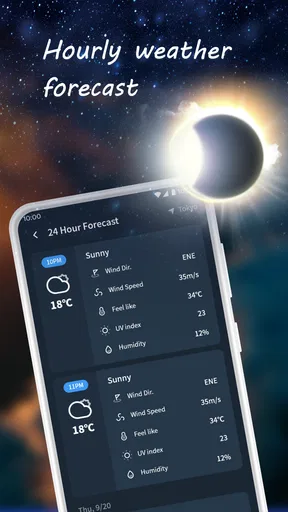
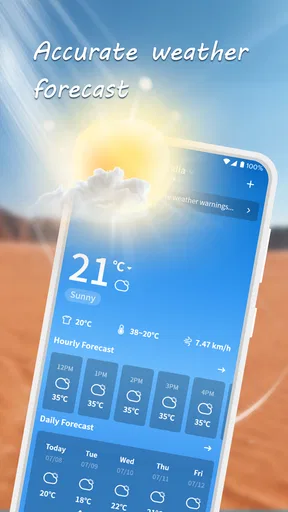
The first practical advantage is the focus on familiar details: temperature, conditions, and a five-day outlook. I don’t have to decode a dense dashboard just to decide what to wear. The customization options described in the app let me select details such as humidity or wind speed, or keep the view pared back. That choice matters for readability: someone who wants only the basics can reduce visual noise, while a person planning a walk can keep wind in view.
There is a trade-off, though. A compact forecast helps me make routine decisions, but it is not a substitute for studying a detailed weather map when conditions are changing quickly or a trip depends on precise timing. I would treat the five-day forecast as a planning aid, not a promise. If I were arranging an outdoor event, I’d check again closer to the time and compare with another source when the consequences of a wrong call were significant.
The app has an average rating of 4.4 from around 7,500 ratings, and more than a million installs. That suggests it has found an audience, but popularity alone cannot tell me whether its presentation suits my eyes or habits. It is rated for Everyone, runs on Android 6.0 or later, and its current version is 1.3.5. Those details make it approachable for many Android users, while the age rating is not a claim about accessibility or suitability for every individual.
Less tapping, more useful habits
Widgets are useful when I’m leaving home in a hurry: I can check conditions from the home screen instead of opening the app and navigating around. I’d place the widget where it is easy to notice, then use it as a prompt to check the full forecast if the day involves a longer journey. This is a small workflow improvement, not a guarantee that I’ll see every change in time.
Alerts can also help when a significant weather change matters to my plans. I’d use them as a backup rather than relying on a notification as my only warning: phones can be muted, notifications can be overlooked, and a forecast can change. If I’m responsible for someone else’s schedule or need to make a safety-critical decision, I’d actively check current conditions instead of waiting for an alert.
Those options can reduce repeated taps, but the experience still depends on how comfortably I can read and operate my phone. A widget may be easier for someone who finds app navigation tiring, yet small text or a crowded home screen can create a different obstacle. I’d test the layout in the settings I actually use, including larger text or screen magnification if those are part of my routine, rather than assuming a clean design works equally well for everyone.
What it does well—and where I’d look elsewhere
For quick household planning, commuting, or deciding whether a short errand can wait, Nice Weather has a sensible role. Someone who mainly wants a clear glance at conditions and a modest forecast may appreciate the customization more than a data-heavy interface. It is also free, which makes it easy to try without committing to a purchase.
Compared with the weather app already on a phone, its value is not automatically that it has more information; it is whether its chosen details and widget fit the way I check the weather. Compared with specialist weather services, the simpler presentation is easier to scan but may not suit users who routinely need advanced maps or detailed storm tracking. I would keep a second trusted source available for outdoor work, travel disruptions, or rapidly developing severe conditions.
A realistic use is a weekday morning when I need to walk to a bus stop and later spend time outside. I can glance at the widget, notice the temperature and conditions, then open the app to check wind or humidity before choosing layers. If an alert arrives later, it can prompt another check. That is a practical routine, but it does not replace checking the forecast for each location on a long trip or watching official local warnings during dangerous weather.
Comfort, context, and the remaining barriers
Weather information is most accessible when it is legible in the moment it is needed. A clean screen and optional details can help people who prefer less visual clutter, while a widget can shorten the route to a quick answer. In bright daylight, on a moving commute, or while carrying bags, however, even a simple screen can be awkward to use. I’d check the forecast before setting off rather than trying to read and tap while walking.
There are also sensory and motor considerations. A notification may be useful to someone who cannot keep checking the screen, but sound or vibration may not suit every person or setting. A person with limited dexterity may benefit from fewer navigation steps, yet small controls can still be difficult to target. I can’t assume the app solves those issues just because its design is straightforward; actual comfort depends on the device, display settings, and the individual.
One useful habit is to make the main screen match the decision I make most often. If I’m deciding what to wear, temperature and conditions may be enough; if I cycle, wind speed may matter more. Keeping only the relevant details can make a fast glance more meaningful. For a family member who prefers a simpler view, I’d help set it up once and then check that the resulting screen is genuinely easy for them to read and use.
The app is developed by Znd Digital, was released on November 26, 2024, and has 457 reviews alongside its broader rating count. Those figures provide a little context, but my decision would still come down to day-to-day fit: whether the forecast layout is comfortable, whether the widget earns its space, and whether alerts are useful rather than distracting.
A practical choice for everyday checks
If you’re tired of checking the weather app on your phone and getting bombarded with ads or cluttered interfaces, then let me introduce you to Nice Weather. I've been using it for a few weeks now, and let me tell you, it lives up to its name.
Simple and Clean Interface
One of the first things you'll notice about Nice Weather is its sleek and straightforward design. It doesn’t try to overwhelm you with unnecessary information. Instead, it presents the essentials: temperature, weather conditions, and a five-day forecast. Everything is laid out in a way that’s easy on the eyes and intuitive to navigate.
Customization at Your Fingertips
Another feature that really caught my attention is the level of customization available. You can choose which details you want to see. Want to know the humidity levels or wind speed? Just toggle it on. Prefer a minimalist view with just the temperature? You got it. The app lets you tailor the experience to suit your needs, keeping it personal and user-friendly.
Widgets and Alerts
I’m a big fan of widgets, and Nice Weather doesn’t disappoint. It offers a range of widget options that sit nicely on your home screen. You can glance at the current weather without even opening the app. Plus, the alert feature ensures you never get caught in the rain without an umbrella again. It sends you timely notifications about significant weather changes, which is a lifesaver for those spontaneous trips out.
Battery and Data Friendly
One of the reasons I initially hesitated to download a weather app was the fear of it draining my battery or gobbling up data. Thankfully, Nice Weather seems optimized to consume minimal resources. I’ve barely noticed any difference in battery life, and the data usage is impressively low.
Final Thoughts
To wrap it up, Nice Weather is a breath of fresh air in the world of weather apps. It has everything you need without the fluff. It's perfect for anyone who wants reliable weather updates in a simple, customizable format. If you’re looking to upgrade your weather app experience, I’d definitely recommend giving this one a shot. It’s available for both Android and iOS, so why not download it and see if it makes your weather check a bit nicer?
Privacy and Permissions
See what permissions an app requests and how it handles your data.
- Location
- approximate location (network-based), precise location (GPS and network-based)
- Wi-Fi connection information
- view Wi-Fi connections
- Other
- view network connections, disable your screen lock, full network access, run at startup, control vibration, prevent device from sleeping, Google Play license check
Verdict
Strengths of Nice Weather
- User-friendly interface for quick navigation.
- Accurate weather forecasts and updates.
- Customizable alerts for severe weather.
- Minimal battery consumption and efficient performance.
- Integrates with calendar for weather planning.
Limitations of Nice Weather
- Limited widgets for home screen customization.
- Ads can be intrusive in free version.
- Some advanced features require subscription.
- Occasional delays in loading new data.
- No offline mode for weather updates.
Similar Picks in This Category
View All
Weather - By Xiaomi
Xiaomi Inc.4.1

Weather & Radar Forecast
WetterOnline4.8

Weather
OneLouder Apps4.6

AccuWeather: Weather Radar
AccuWeather3.6

The Weather Channel - Radar
The Weather Channel4.6

1Weather Forecasts & Radar
OneLouder Apps4.3
Frequently Asked Questions
What features does Nice Weather offer?
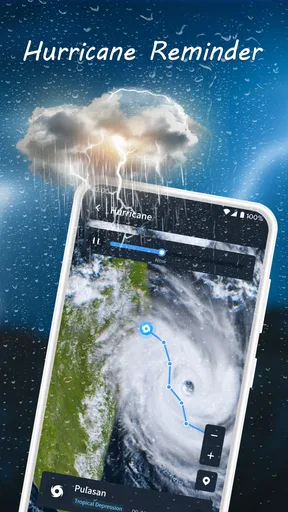
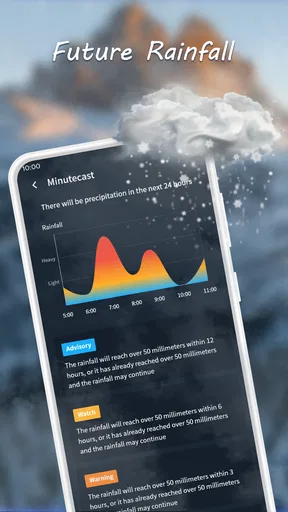
Nice Weather provides real-time weather updates, detailed forecasts, and customizable alerts. It includes features like radar maps, air quality indices, and UV levels. Users can also enjoy a sleek interface with easy navigation and the ability to view weather conditions in multiple locations worldwide.
Is Nice Weather available for both Android and iOS devices?
Yes, Nice Weather is available on both Android and iOS platforms. Users can download it via the Google Play Store for Android devices and the Apple App Store for iOS devices. The app is optimized for both smartphones and tablets, ensuring a seamless experience across different devices.
Does Nice Weather require an internet connection?
While Nice Weather offers some offline functionality, such as viewing previously loaded forecasts, an internet connection is required for real-time updates and accurate weather information. For the best experience, it is recommended to use the app with a stable internet connection.
Are there any subscription fees or in-app purchases?
Nice Weather offers both a free version with basic features and a premium version with additional features such as ad-free usage and advanced forecasting tools. Users can opt for a monthly or yearly subscription to access these premium features. Prices may vary based on your region.
How accurate is the weather data provided by Nice Weather?
Nice Weather sources its data from reputable meteorological agencies, ensuring high accuracy and reliability. The app updates frequently to deliver the latest weather conditions and forecasts. However, as with any weather app, occasional discrepancies can occur due to rapidly changing weather conditions.
